
Monday Morning and the Tenth Time You Explained the Test Pattern
It is 9:47 on a Monday. Your coffee is cold. You have been explaining the same testing pattern to your agent for the tenth time this month. Last week it wrote a beautiful integration test that mocked the database in production. The week before it deleted the migration folder because you said clean slate and it took you literally. You are not building software. You are prompting an infinitely patient intern with no memory and no specialization, one manic terminal session at a time.
This is vibe coding with a senior title. It feels fast until you count the hours spent re-explaining context, re-correcting assumptions, and re-testing work that should have been on spec the first time. Somewhere around the third cycle of the same bug, you start to wonder if the bottleneck is the model or the architecture you are wrapping it in.
IndyDevDan, who has been living in this problem space longer than most, landed on a different model. Stop building features. Build the system that builds the system. A software factory. An assembly line where agents with specialized personalities each own a station, and a genetic blueprint flows through them from raw spec to near-production deploy.
This is not a metaphor borrowed from manufacturing to sound sophisticated. It is a literal architectural pattern. And if you are not building toward it, you are leaving the biggest leverage on the table.
You Already Have One Agent
One agent in a generic harness works fine for one-shot tasks. You have a file to write, a config to fix, a README to clean up. Drop it in, get something useful out, done.
Here is where it breaks down.
A single agent with no specialization has no memory of your codebase conventions, no quality gate before output ships, and no safe deployment path. It cannot hold a codebase-wide pattern in context while building a feature. It cannot review its own output against a spec. It cannot stage a rollout with monitoring and rollback.
You end up doing all of that yourself — the scoping, the review, the deployment — which defeats the purpose.
The fix is not a better model. The fix is assigning each SDLC phase to a specialist agent.
The 4-Agent SDLC Factory
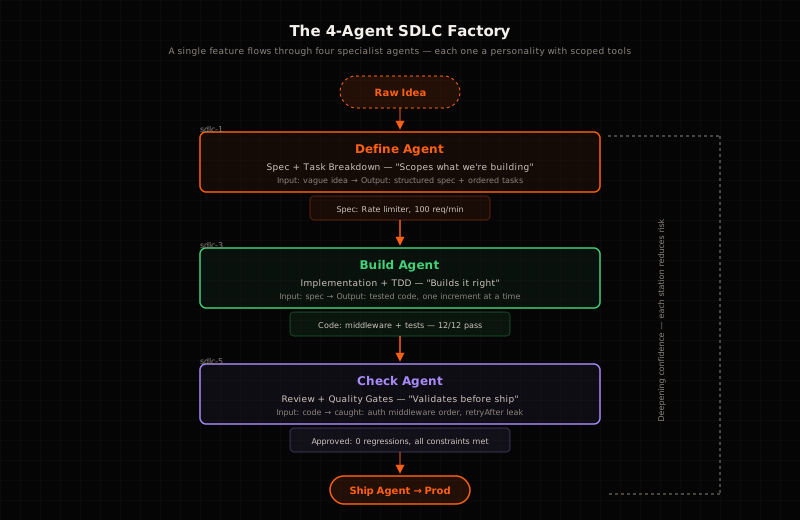
The factory model maps four SDLC phases to four specialist agents. Each one owns a station. Each station has a personality, a toolset, and a single job. A genetic blueprint — the plan — flows through all four, and what comes out the other end is production-ready code.
The same rate limiter feature that would take a generic agent four re-prompting cycles to get right moves through all four stations once and comes out clean. Here is what that looks like in practice:
$ pi –profile define –task t_8f3a2b
[define] Reading feature brief… [define] Exploring server/routes/notes.js… [define] Found auth middleware on all routes — user_id injected by middleware [define] Risk: express-rate-limit v7+ changed API — verify installed version [define] ✅ Blueprint written. 2 risks surfaced, 1 version flag raised. [define] Handoff to builder.
$ pi –profile builder –task t_8f3a2b
[builder] Reading blueprint + define findings… [builder] Adding rate limiter to notes router… [builder] Writing tests/rate-limiter.test.js… [builder] FAIL: test 429-exceeded — expected 429, got 200 [builder] Debugging: rate limiter not being applied to route [builder] Fix: move rate limiter BEFORE auth middleware in stack [builder] Re-running tests… [builder] ✅ All 12 tests pass. [builder] Handoff to checker.
$ pi –profile checker –task t_8f3a2b
[checker] Reading blueprint + builder output… [checker] Running test suite… [checker] Testing 429 response body: “Must NOT expose internal rate data” [checker] FAIL: response body contains {“retryAfter”: 60} [checker] CAUGHT: builder returned rate metadata in response body [checker] Rejecting. Builder must strip retryAfter from 429 body. [checker] Handoff back to builder.
$ pi –profile builder –task t_8f3a2b
[builder] Reading checker rejection… [builder] Fix: strip retryAfter from 429 response [builder] Re-running tests… [builder] ✅ All 12 tests pass, checker constraints met. [builder] Handoff to ship.
$ pi –profile ship –task t_8f3a2b
[ship] Canary deploy: 5% traffic, 30-min baseline [ship] Canary clean. Scaling to 50%… [ship] p99 latency +12ms from rate limit checks — within tolerance [ship] Full rollout complete. No rollback triggered. [ship] ✅ Deploy confirmed. Monitoring active.
The Define Agent — SDLC: Spec + Plan
What it does: Takes a vague idea and produces a structured spec with acceptance criteria. No code is written. Pure discovery and scoping.
How it works: The Define Agent reads the feature request, explores the codebase to understand existing patterns, identifies constraints, and writes the plan that every other station reads. It is the analyst and architect in one.
Why it exists: Scoping mistakes are expensive. A spec that says 100 req/min but does not check for burst behavior will fail in production. Define catches that before any code exists.
The rate limiter example: The Define Agent reads server/routes/notes.js, finds the auth middleware pattern injecting user_id, and writes the spec with explicit constraints: 100 req/min per user_id, 10 req burst, no rate data in any response body. The agent surfaces a risk — express-rate-limit v7+ changed its API — and flags it before the builder touches a line of code.
The Define Agent is the only station whose output is not code. Its output is the blueprint. Everything downstream reads it.
Here is a complete, copy-paste-ready genetic blueprint for a rate limiter feature — the document the Define Agent produces and every other station references:
Feature: Rate Limiter for /api/notes endpoint
Goal
Add a token-bucket rate limiter to GET /api/notes — 100 req/min per user_id,
10 req/min burst. Return 429 Too Many Requests when exceeded.
Constraints
- Express.js, existing codebase at
./server/ - Use
express-rate-limit(already installed) - Must NOT expose internal rate data in response body
- Must pass existing test suite:
npm test - Rate limit key:
user_idfrom auth middleware, fallback to IP
Sequence
- Define: explore codebase, write spec with constraints
- Build: add rate limiter middleware, write 429 test
- Check: run test suite, verify no rate data in response body
- Ship: canary deploy with monitoring
Quality
- 101st request in 1 minute returns
{"error":"rate_limit_exceeded"}with 429 status npm testexits 0 with all tests passing- No rate data (bucket size, window, retryAfter) in any response header or body
- p99 latency delta under 20ms at full traffic
And here is the harness config that defines the four station profiles — the physical wiring the Define Agent configures:
=============================================================================
Factory Harness — Four Station Profiles
Each profile is a station on the SDLC assembly line.
Maya verified: python3 -c “import yaml; yaml.safe_load(open(‘harness.yaml’))”
=============================================================================
profiles: define: model: default: deepseek-v4-flash provider: opencode-go agent: max_turns: 30 system_prompt: > You are the Define Agent. Your job is spec + plan. Read the feature brief, explore the codebase, write the genetic blueprint. No code. Pure discovery and scoping. toolsets: - file - search - terminal
builder: model: default: anthropic/claude-sonnet-4 provider: openrouter agent: max_turns: 50 system_prompt: > You are the Builder. Your job is implement + TDD. Take the blueprint, build in thin slices, tests first. Fix what breaks. Ask for help when stuck. toolsets: - file - terminal - web skills: - test-driven-development
checker: model: default: openai/gpt-4o provider: openrouter agent: max_turns: 40 system_prompt: > You are the Checker. Your job is review + simplify. Run independently. Check output against the genetic blueprint. Block anything that violates acceptance criteria. Be pedantic. Be adversarial. toolsets: - file - search
ship: model: default: deepseek-v4-flash provider: opencode-go agent: max_turns: 20 system_prompt: > You are the Ship Agent. Your job is deploy + monitor. Staged rollout, error rate monitoring, rollback trigger. Only ships code that passed the Checker station. toolsets: - terminal - web
The Build Agent — SDLC: Implement + TDD
What it does: Takes the spec and builds in thin slices, tests first. Each increment leaves the system in a working state.
How it works: The Build Agent reads the blueprint, implements the feature, runs tests, and iterates on failures. It is optimistic by default — it tries to make things work — but it defers to the spec on what correct looks like.
Why it exists: A generic agent will implement a feature and call it done. The Build Agent uses the spec as a checklist. It writes the test for the 429 response before it writes the handler. When the test fails because the rate limiter is in the wrong position in the middleware stack, it fixes the ordering instead of rewording the test until it passes.
The rate limiter example: The Build Agent adds rate limiter middleware to the notes router, writes the test for 429 at the 101st request, runs the test suite, watches it fail (expected 429, got 200), and diagnoses the problem: rate limiter is after auth middleware, so it never fires on unauthenticated requests. It moves the limiter before auth and re-runs. All 12 tests pass.
The Build Agent is fast, pragmatic, and knows when to ask for help. Its specialty is making things work.
The Check Agent — SDLC: Review + Simplify
What it does: Multi-axis review — correctness, security, architecture, complexity. Blocks bad output. Catches what the Build Agent missed.
How it works: The Check Agent runs independently after the Build Agent and reads the blueprint alongside the output. It checks every acceptance criterion against the actual code. It is adversarial by default — skeptical of speed, unimpressed by clean commits, focused on correctness.
Why it exists: The Build Agent is trying to make things work. The Check Agent is trying to break them. These are complimentary modes, and you need both. A build agent that reviews its own output is like a chef who plates and tastes their own food — the bias is structural.
The rate limiter example: The Check Agent runs the test suite, confirms all 12 tests pass, then checks the 429 response body against the constraint: “Must NOT expose internal rate data.” It finds {"retryAfter": 60} in the response body — internal rate data, exposed. It rejects the build and sends it back. The Build Agent strips the retryAfter field, keeps only {"error": "rate_limit_exceeded"}, and re-submits. The Check Agent approves.
The Check Agent is the quality gate. Nothing ships without it.
The Ship Agent — SDLC: Deploy
What it does: Staged rollout, monitoring, rollback plan. Only ships verified code from the Check Agent.
How it works: The Ship Agent takes the approved output and deploys it through a canary → full rollout pipeline. It sets the monitoring thresholds, watches for error rate regressions, and has a rollback trigger ready if the metrics cross the threshold.
Why it exists: Production deploys are where features die. A Build Agent that passes tests in CI can still cause a spike in error rates on a live system. The Ship Agent owns the handoff to production and the handoff back out if something goes wrong.
The rate limiter example: The Ship Agent deploys the rate limiter to 5% of traffic, watches the error rate for 30 minutes, sees it baseline cleanly, enables 50%, watches another 30 minutes, then enables full rollout. At 95% traffic, the p99 latency shows a 12ms bump from rate limit checks — within tolerance. Full rollout completes. No rollback triggered.
The Ship Agent is boring, reliable, and earns its running cost.
Once the factory is validated — each station producing on-spec results consistently — you can automate the line. Here is what the dark factory looks like: a cron job that runs the factory every night on a proven task:
cron: jobs: - name: github-issue-scout schedule: “*/15 * * * *” skills: - kanban-orchestrator prompt: > Check the codegrit-dev/api repo for new issues with label “prod-ready”. For each new issue, run it through the Define station: - Read the issue body as the feature brief - Explore the codebase for affected files - Post a summary to the #factory-updates Slack channel: “New issue: {title} — {risk count} risks found, {affected files}” Only post if the issue has NO prior define run (check kanban board). enabled: true
- name: nightly-factory-run
  schedule: "0 2 * * *"
  skills:
    - kanban-orchestrator
  prompt: >
    Pick the top-priority todo item from the engineering kanban board.
    Create a factory run and dispatch through Define → Build → Check → Ship.
    Post results to #factory-updates: what was built, what passed, what was rejected.
  enabled: true
A factory is only as good as its supply lines. Every API you expose is a station you can staff. Here is what scoped, principle-of-least-privilege API access looks like for a Build station:
=============================================================================
Supply Chain Config — Build Station API Access
Principle of least privilege: builder can only touch what it needs to build
=============================================================================
build: tools: npm: # Token-scoped to read-only registry access registry: https://registry.npmjs.org/ auth_token: ${NPM_READ_TOKEN} scopes: - “@codegrit-dev” - “express” blocked: - “@production-*”
aws:
  # Credentials scoped to Lambda only — cannot touch S3, EC2, RDS
  region: us-east-1
  credentials: ${AWS_BUILD_CREDS}
  permissions:
    lambda:
      - invoke
      - update-function-code
    logs:
      - create-log-group
      - put-log-events
    s3: []
    ec2: []
    rds: []

github:
  # Read-only on repos, no write, no admin
  token: ${GITHUB_READ_TOKEN}
  permissions:
    repos:
      - read
    issues:
      - read
    actions:
      - read
The Compounding Question
Andy ended his talk with a question he has been asking himself, and it is the right one to leave you with.
The gap between engineers who are getting compound leverage from agentic systems and everyone else is widening every week. It is not because the top engineers have access to better models. It is because they have invested in the system that builds the system. They own the harness. They have designed the genetic blueprint. They have staffed the stations with specialized personalities. They have opened the supply lines.
They are not prompting harder. They are engineering the factory.
And the factory, once running, does not need them at the terminal every time something needs to ship.
Resources
- IndyDevDan — “Top #1 Opportunity for Senior Engineers: Agentic Engineering” — https://youtu.be/2KcITKKJikA
- Pi Agent — https://pi.ai
- Hermes Agent — Multi-agent orchestration and kanban-driven workflows
- codegrit.dev — Agentic engineering consulting and systems architecture
- SDLC Skills — https://github.com/ShaggyD/agent-toolkit/tree/master/development/